Tonkotsu: Turning Developers from "Coders" into "Managers"
2026-01-28 | tonkotsu.ai | ProductHunt
30-Second Quick Judgment
What is it?: A tool to manage multiple AI coding agents via a single document. You write the task list, agents execute in parallel, and you simply review the diff and commit.
Is it worth your time?: Yes. If you're already using Cursor or Claude Code but feel that "one agent isn't enough" or your prompt management is getting messy, this is the first tool to seriously address multi-agent collaboration. Its #1 spot on Product Hunt launch day was well-earned.
Three Questions for Me
Is this for me?
Target Audience:
- Developers already using AI (not AI skeptics)
- Working on JS/TS projects (currently optimized for these languages)
- Efficiency seekers who find existing tools "messy to manage"
Does this sound like you? You're the target if:
- You have 3 Cursor windows open, constantly switching between prompts
- You use Claude Code but your tasks are too big for the context window
- You want the AI to do more, but you're afraid of it going rogue
Use Cases:
- Modifying multiple files/features at once → Use this for parallel execution
- Breaking a big task into sub-tasks → Use this to plan and delegate
- Tired of babysitting AI output → Use this to just review the final diff
Is it useful?
| Dimension | Benefit | Cost |
|---|---|---|
| Time | Multi-agent parallel work = faster completion | Learning curve of a new tool |
| Money | Free during Early Access | Must provide your own API keys |
| Energy | No more juggling prompts across 5 windows | Need to learn to "write task lists" instead of "writing prompts" |
ROI Judgment: If you spend 2+ hours daily coding with AI, it's worth 30 minutes to learn this. If you only use Copilot for occasional autocompletion, you don't need this yet.
Is it a good experience?
The "Wow" Factors:
- Parallel Execution: Drop 10 tasks, agents work simultaneously while you grab a coffee
- Doc-centric: No complex prompt formats; just use bullet points
- Review before Commit: It won't sneakily change your code; you see every diff first
The Buzz:
"AI coding tools are everywhere. But shipping an entire app from one prompt still feels risky. @tonkotsudotai is an awesome fresh take on this" — @DataChaz (Twitter)
Real User Feedback:
Positive: "Doc-as-control panel for coding agents feels right. I'm tired of juggling prompts in five places." — @Alex Cloudstar
Questioning: "The parallel task execution is fire — curious how it handles conflicting changes across agents?" — @bhaidar
Brand Love: "First of all, love the branding. Sounds really cool." — @Bekah
For Indie Hackers
Tech Stack
- Platform: Desktop App (macOS & Windows)
- Language Optimization: JavaScript & TypeScript (Natural Language IDE)
- Security: SOC 2 Type I audited; code runs in locally isolated repo clones
Core Implementation
Tonkotsu's core is the "plan → code → verify" loop:
- You write technical decisions and task lists in the doc
- Each task is linked to a repo and branch
- Click "Code," and agents execute in parallel
- Review the diffs and commit if satisfied
The biggest difference from traditional AI tools: It's not about "chatting with AI to write code," it's about "acting as a tech lead managing a team of agents."
Open Source Status
- Is it open source?: No
- Similar OS Projects: You could build a similar architecture with LangChain/CrewAI, but you'd have to build the UI yourself
- Build Difficulty: High. Multi-agent coordination, conflict resolution, and UI are significant hurdles (estimated 3-6 person-months)
Business Model
- Monetization: Free Early Access; likely subscription-based in the future
- Pricing: Not yet announced
- Hidden Costs: Bring your own API keys
Giant Risk
Medium risk. GitHub Copilot Workspace is working on something similar, but Tonkotsu's doc-centric approach is cleaner. Success depends on building a user base before GitHub fully scales up.
For Product Managers
Pain Point Analysis
What problem does it solve?: "Management chaos" for AI-assisted developers
- Switching between Cursor, Claude Code, and Copilot
- Prompts for a single task scattered in 5 different places
- Wanting the AI to do more without losing control
How painful is it?: High frequency, medium intensity. It's a daily annoyance that most people are currently just tolerating.
User Persona
| Persona | Characteristics |
|---|---|
| AI Heavy User | 2+ hours/day coding with AI; AI is their primary driver |
| Efficiency Seeker | Wants to delegate all repetitive work |
| Control Enthusiast | Doesn't want a black box; needs to see every line of change |
Feature Breakdown
| Feature | Type | Description |
|---|---|---|
| Doc-based planning | Core | Write tasks in a doc; no need to memorize prompt formats |
| Parallel Execution | Core | Multiple agents working simultaneously |
| Diff Review | Core | All changes reviewed before committing |
| Task Dependency Management | Core | Handles relationships between tasks |
| Share Feature | Nice-to-have | Team collaboration |
Competitive Differentiation
| vs | Tonkotsu | Cursor | Claude Code |
|---|---|---|---|
| Interaction | Doc-based tasks | In-IDE Chat | CLI Commands |
| Multi-agent | Native Support | Not Supported | Not Supported |
| Parallelism | Yes | No | No |
| Positioning | "Manager" | "Assistant" | "Tool" |
| Learning Curve | Medium | Low | High |
Key Takeaways
- Differentiated Positioning: "Stop Coding, Start Leading"—it's not a better IDE, it's a new category
- Doc-centric Design: Uses a familiar format (docs) to reduce cognitive load
- Parallel Execution: Directly addresses a major pain point in current tools
For Tech Bloggers
Founder Story
- Founder: Derek Cheng
- Background: Former Microsoft Manager, University of Waterloo CS grad
- Startup Story: Went through a tough bootstrapping phase, living on $13/week (excluding rent)
- Company: Tonkotsu AI Inc., based in Seattle
Discussion Angles
- Is "Stop Coding" too radical?—Are developers really ready to move from writing to managing?
- How are multi-agent conflicts handled?—The most asked question on Twitter
- Will it be crushed by GitHub?—The perennial concern of giants entering the space
Hype Data
- PH Ranking: #1 Daily, #9 Weekly, 396 votes
- Twitter Buzz: <20 high-relevance tweets, generally positive with no major negatives
- Hacker News: Featured in a Show HN post (Oct 2024)
- Sponsorship: Official sponsor of AI Conference 2025
Content Suggestions
- Angle: "From Copilot to Tonkotsu: The Evolution of AI Programming Tools"
- Trend Hook: Connect it to the "Year of AI Agents" narrative; Tonkotsu is a prime example of coding agents in action
For Early Adopters
Pricing Analysis
| Tier | Price | Features | Is it enough? |
|---|---|---|---|
| Early Access | Free | Full features | Yes, but BYO API keys |
| Future Pricing | TBD | - | - |
Getting Started
- Setup Time: 30 minutes
- Learning Curve: Medium (requires a mindset shift from "chatting" to "delegating")
- Steps:
- Download the desktop app (macOS/Windows)
- Connect your repo
- Write a task list using bullet points
- Hit the "Code" button
- Review the diff and commit
Pitfalls & Complaints
- Language Limits: Optimized for JS/TS; other languages are a question mark
- API Keys: You need your own; management of these keys isn't fully detailed
- Conflict Handling: How it handles overlapping changes from parallel agents isn't well-documented yet
Security & Privacy
- Data Storage: Runs locally; code stays in isolated repo clones
- Security Audit: SOC 2 Type I passed
- Privacy: Code doesn't leave your machine (except for API calls)
Alternatives
| Alternative | Advantage | Disadvantage |
|---|---|---|
| Cursor | Mature, great ecosystem | Single agent, no parallelism |
| Claude Code | Strong Opus capabilities | High CLI barrier, no GUI |
| Copilot Workspace | GitHub native | Waitlist, not fully open |
| Self-built | Total control | High development cost |
For Investors
Market Analysis
- Market Size: AI Agents market $7.8B in 2025, projected $52.6B by 2030 (46.3% CAGR)
- Growth: Coding Agents is the fastest-growing sub-segment
- Reference Case: Lovable projected to hit $1B ARR by mid-2026 (100x growth in 18 months)
- Drivers: 85% of devs use AI tools, but most are currently limited to "single-agent" workflows
Competitive Landscape
| Tier | Player | Positioning |
|---|---|---|
| Top | GitHub Copilot | In-IDE completion + chat |
| Mid | Cursor, Claude Code | IDE/CLI focused |
| New | Tonkotsu | Multi-agent management |
Timing Analysis
Why now?:
- Pivot point from experimental to production-ready AI agents
- Gartner predicts 40% of enterprise apps will embed AI agents by 2026
- Developers are habituated to AI and are looking for higher-order tools
Tech Maturity: High. Underlying models (Sonnet/GPT-4) are now capable enough for complex orchestration.
Team & Funding
- Founder: Derek Cheng (ex-Microsoft Manager, Waterloo CS)
- Company: Tonkotsu AI Inc., Seattle
- Funding: Undisclosed, but sponsorship of major AI conferences suggests capital availability
Screenshot Breakdown
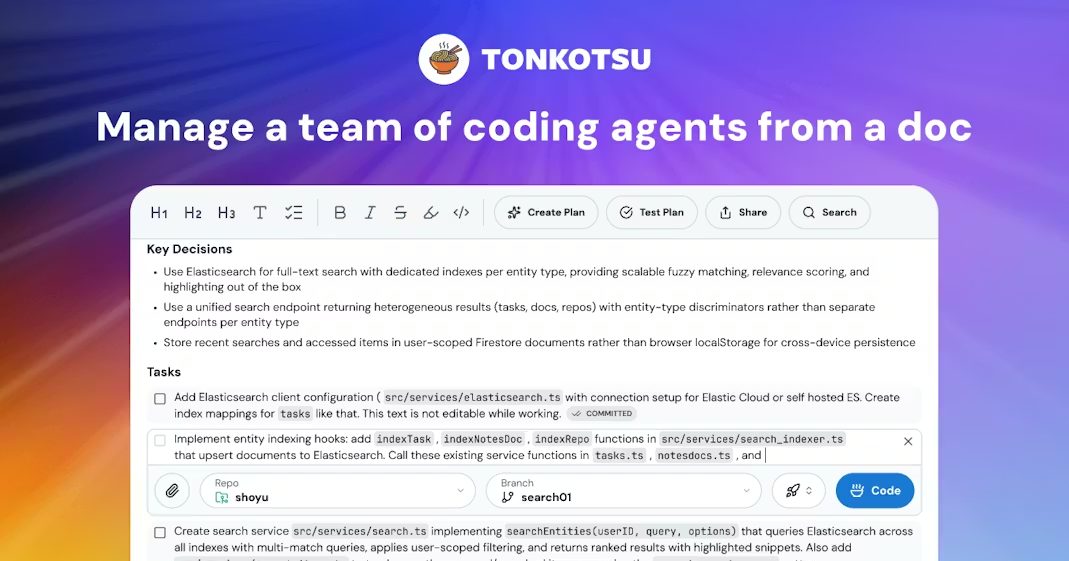
Main Interface: Doc-centric Task Management
The UI clearly reflects the "doc as control panel" philosophy:
- Top toolbar with standard rich text formatting
- "Key Decisions" area for technical oversight
- Task list below, with repo/branch selection for each
- "Code" button in the bottom right to trigger agents
Full Workflow
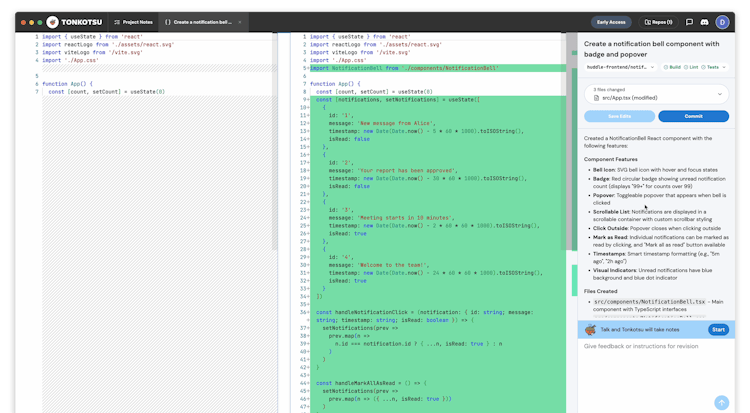
A three-pane layout showing the complete workflow:
- Left: Project Notes (Task planning)
- Middle: Code Diff View (Before vs. After)
- Right: Task Details + Chat (For providing feedback)
The footer "Talk and Tonkotsu will take notes" hints at voice-to-task interaction design.
Conclusion
Final Verdict: Tonkotsu captures the next logical step for AI coding tools—moving from "single-agent chat" to "multi-agent management." The direction is right and the execution is solid, though it's still in the early stages.
| User Type | Recommendation |
|---|---|
| Developer | ✅ If you're a JS/TS dev and a heavy AI user, it's worth a try now |
| Product Manager | ✅ A new category to watch; the doc-centric design is a great reference |
| Blogger | ✅ Great narrative: "AI turning devs into managers" is a strong hook |
| Early Adopter | ⚠️ Try it while it's free, but keep an eye on language support and conflict handling |
| Investor | ⚠️ Great sector and timing, but very early stage; watch for traction data |
Resource Links
| Resource | Link |
|---|---|
| Official Website | https://tonkotsu.ai/ |
| ProductHunt | https://www.producthunt.com/products/tonkotsu |
| https://x.com/tonkotsu_ai | |
| Hacker News | https://news.ycombinator.com/item?id=45528826 |
| DevHunt | https://devhunt.org/tool/tonkotsu |
2026-01-28 | Trend-Tracker v7.3