LocateStore: Turn Google Sheets into a Store Map—So Simple It's Almost Boring
2026-01-28 | Official Site | ProductHunt
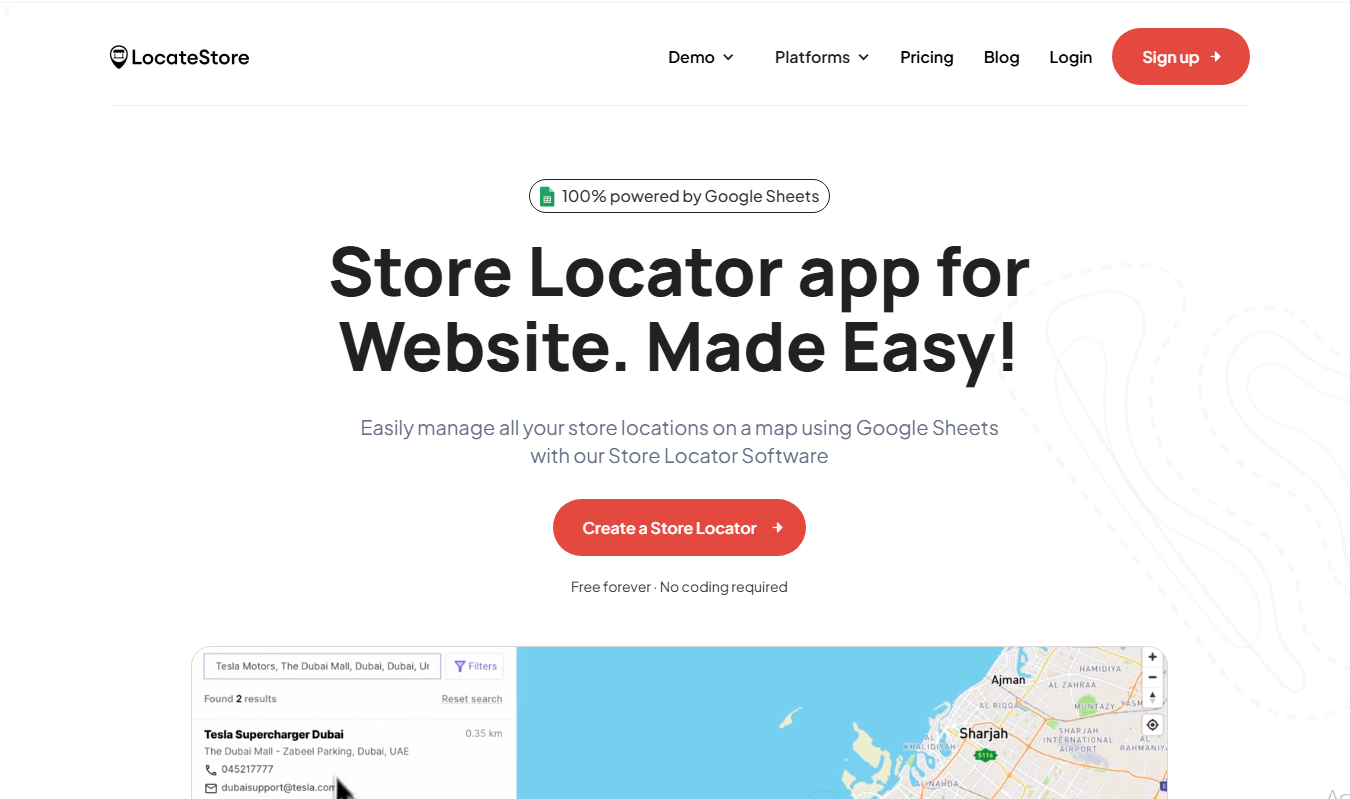
Screenshot Breakdown: The LocateStore homepage makes its core selling point clear—"100% powered by Google Sheets"—demonstrated with a live search for Tesla Dubai stores. The design is clean, with a prominent red CTA button.
30-Second Quick Judgment
What it does: Automatically turns store addresses in a Google Sheet into an interactive map embeddable on your website, supporting search, filtering, and navigation.
Is it worth it?: If you have multiple locations and need a "nearby store" feature, this is likely the most hassle-free solution. No coding, no API keys—just update a spreadsheet to sync. However, if you only have one or two locations, a simple Google Maps embed is probably enough.
Three Key Questions
Is it for me?
Target Users:
- Retail chains (Apparel, Electronics, Supermarkets)
- Restaurant franchises (Coffee shops, Fast food, Dining)
- Service centers (Banks, Clinics, Gyms, Repair shops)
- Dealer networks (Automotive, Appliances)
Do you fit?: You are the target user if:
- You have more than 3 locations and need customers to "find the nearest store."
- You use WordPress, Shopify, Wix, etc., and don't want to code.
- You don't have a dedicated developer but need to maintain store info.
Typical Scenarios:
- A "Store Locator" page on a restaurant website.
- A "Find a Dealer" feature for B2B networks.
- Temporary maps for events or pop-up shops.
Is it useful?
| Dimension | Benefit | Cost |
|---|---|---|
| Time | Set up in 10 minutes; update via spreadsheet | Near-zero learning curve |
| Money | Free tier works for low traffic; saves dev costs | High traffic requires a paid plan |
| Effort | No API or server management needed | Limited by Google Sheets' collaboration constraints |
ROI Judgment: If you're considering hiring a dev for a store locator, try the free version first. It covers 80% of use cases, and you'll know if it works for you in 10 minutes.
Is it satisfying?
The "Aha!" Moments:
- Instant Updates: Refresh the page after editing the Sheet to see changes—no deployment needed.
- Modern Mapbox Aesthetics: Looks more modern and loads faster than default Google Maps styles.
- Copy-Paste Embedding: Full support for WordPress, Shopify, and Wix.
User Quote:
"I was blown away by how simple it was use Store Locator! Also their UI/UX is simply the best." — SoftwareAdvice Review
Real Feedback:
Positive: "Used it on a website I'm building and it was the fastest store locator I've ever used!" — Official Site Critique: "Addresses are often messy, duplicated, or half-filled" — @Dmitry_Petrakov (PH Comment)
For Indie Developers
Tech Stack
- Map Engine: Mapbox API
- Data Source: Google Sheets (Direct read, no database required)
- Geocoding: Mapbox Geocoding API (Auto-converts addresses to coordinates)
- Deployment: iframe/embed code
Core Implementation
In short: Read Google Sheet → Batch geocoding → Render Mapbox map → Output embed code.
Technically straightforward, the value lies in:
- Abstracting Mapbox's complex configuration.
- Handling "dirty" address data (normalization, skipping invalid rows).
- Ensuring cross-platform embed compatibility.
Open Source Status
- LocateStore is not open source.
- Similar Open Source Projects:
- jQuery-Store-Locator-Plugin - Uses Google Maps.
- js-store-locator - Google's archived official library.
Build vs. Buy
- Technical Barrier: Medium.
- Core Effort: Mapbox integration + geocoding + embed generator.
- Estimate: A full-stack dev could build an MVP in 1-2 weeks.
- Verdict: For most, paying $0 to a few dozen dollars a month is more cost-effective than building and maintaining it.
Business Model
- Freemium: Free version offers 100 map loads + 500 searches/month.
- Paid: Removes branding, allows custom URLs, and higher traffic limits.
- Annual Discount: 3 months free with yearly billing.
Giant Risk
Google Maps has its own store locator, but:
- The 2018 price hike drove many to Mapbox.
- LocateStore's edge is the simplicity of "Google Sheets as a backend," a niche Google is unlikely to target.
Conclusion: Safe in the short term; long-term stability depends on the Mapbox ecosystem.
For Product Managers
Pain Point Analysis
- High-Frequency Need: Multi-store brands all need "nearby store" features.
- Traditional Pain Points:
- Need to apply for Google Maps API keys (requires credit card).
- Need to write code or buy complex plugins.
- Updating store info is tedious.
- LocateStore Solution: Uses the tool everyone already knows—Google Sheets.
User Personas
| Type | Characteristics | Typical Scenario |
|---|---|---|
| Small Chain Owner | 5-50 stores, no IT team | Adding a locator to their official site |
| E-commerce Ops | Shopify/WooCommerce stores | Managing physical showrooms |
| Marketing Dept | No-code, needs fast deployment | Event or pop-up shop maps |
Competitive Landscape
| Dimension | LocateStore | Storepoint | Store Locator Plus | POWR |
|---|---|---|---|---|
| Data Source | Google Sheets | Custom Backend | WP Backend | CSV/Sheets |
| Map Engine | Mapbox | Google/Mapbox | Google Maps | Google Maps |
| Free Tier | 100 loads/mo | Limited | Basic Features | Limited |
| No-Code | ✅ | ✅ | Plugin Required | ✅ |
| Platform | All | All | WordPress Only | Wix |
| Highlight | Sheets as Backend | High Customization | SEO Features | 4.2 Stars (645 reviews) |
LocateStore's Differentiator: Using Google Sheets as the only data source is its core feature—and its limit. If you need complex backend management, it might fall short.
Key Takeaways
- Leverage existing tools as data sources: Don't build a backend if Google Sheets, Airtable, or Notion can do the job.
- Instant updates: Lower the barrier for user maintenance.
- Platform Agnostic: Support all major site builders.
For Tech Bloggers
Founder Story
Shyjal Raazi, based in Kerala, India, holds a CS degree from TKM College of Engineering.
After 3 years of software dev, he realized it "wasn't the life he wanted" and began pursuing "freedom." He founded Micro.company to build a portfolio of micro SaaS products.
Previous successes:
- Collect.chat: A website chatbot. An Instagram filter he made during the pandemic got 10M+ impressions in its first week.
- Store.link: A similar product that turns Google Sheets into an e-commerce store.
Entrepreneurial Philosophy: Find problems that allow for "simple solutions, low capital requirements, and fast takeoff."
Discussion Angles
-
The Rise of Alternatives after Google's 1400% Price Hike: In 2018, Google's sudden price increase forced companies toward Mapbox. LocateStore is a direct beneficiary of this shift.
-
The Boundaries of No-Code: Is Google Sheets enough for a backend? What happens with high traffic or complex requirements?
-
The Indian Indie Dev Ecosystem: Shyjal represents a class of entrepreneurs who skip VC funding to build "small and beautiful" tools for subscription revenue.
Hype Data
- ProductHunt: #15 Weekly, 304 votes, peaked at #3 of the day.
- Shopify App Store: Has a dedicated listing.
- Google Workspace Marketplace: Available as an add-on.
Content Suggestions
- "The best Google Maps alternatives after the price hike."
- "How to build a store locator without writing a single line of code."
- "The Micro SaaS methodology of Indian indie developers."
For Early Adopters
Pricing Analysis
| Tier | Price | Features | Is it enough? |
|---|---|---|---|
| Free Forever | $0 | 100 loads + 500 searches/mo | Good for low-traffic sites |
| Standard | Check Site | No branding, custom URL | Recommended for business |
Billing Logic:
- 1 map load = User opens the map page once.
- 1 search = User searches for a location/zip code once.
Advice: Start with the free version to test the waters; upgrade only when traffic scales.
Quick Start Guide
Setup Time: 10 minutes Learning Curve: Nearly zero
Steps:
- Sign up for LocateStore.
- Create a Google Sheet from their template (Name, Address, Phone, etc.).
- Link the Sheet in the dashboard.
- Copy the embed code to your site.
- Edit the Sheet to update the map instantly.
Common Complaints
- Data Quality: Users have noted that "Addresses are often messy." LocateStore attempts to normalize and geocode automatically, but it's best to provide clean, full addresses (Street + City + Zip).
- Free Tier Limits: 100 loads/month can go fast, and the watermark is visible.
- Performance: Unlike some competitors (e.g., Store Locator Plus), LocateStore doesn't suffer from significant loading delays.
Security & Privacy
- Data Storage: Your store data stays in your Google Sheet.
- Risk: You are dependent on both Google Sheets and Mapbox availability.
Alternatives
| Alternative | Advantage | Disadvantage |
|---|---|---|
| Storepoint | High customization | No native Google Sheets sync |
| POWR Store Location Map | 4.2 stars (Wix) | Wix-centric |
| Store Locator Plus (WP) | Feature-rich | WordPress only; some slow loading reports |
| Custom Mapbox API | Full control | Requires dev resources |
For Investors
Market Analysis
Market Size:
- Conservative: ~$1.12B in 2024 → ~$2.37B in 2033, CAGR 8.7%.
- Aggressive: $31.19B in 2025 → $57.06B in 2033, CAGR 9.01%.
Growth Drivers:
- Omni-channel retail (merging online and offline).
- Digital transformation for SMBs.
- AI-driven location intelligence.
Competitive Landscape
LocateStore positions itself as the "simplest solution," using Google Sheets as its unique entry point into the SMB market.
Timing Analysis
- Post-2018 Google Maps price hike created a vacuum for affordable alternatives.
- No-code maturity has made users comfortable with spreadsheet-based backends.
- Physical stores remain a vital part of the retail mix.
Team & Funding
- Founder: Shyjal Raazi (Micro.company).
- Funding: Likely bootstrapped; focused on profitability and micro SaaS sustainability.
Conclusion
Bottom Line: If you need a store locator but don't want to code, LocateStore is currently one of the most efficient options available.
| User Type | Recommendation |
|---|---|
| Indie Dev | ⚠️ Good for inspiration, but too simple to replicate for profit |
| Product Manager | ✅ A great tool to keep in your kit for fast deployment |
| Tech Blogger | ⚠️ The product is simple, but the founder's story is worth a deep dive |
| Early Adopter | ✅ Zero risk; try the free version and see results in 10 mins |
| Investor | ⚠️ Small market/low ceiling; better as a micro SaaS than a VC target |
Resource Links
| Resource | Link |
|---|---|
| Official Site | https://locatestore.com/ |
| ProductHunt | https://www.producthunt.com/products/locatestore |
| Shopify App | https://apps.shopify.com/locatestore |
| Founder's Site | https://shyjal.com/ |
| Help Center | https://locatestore.help.center/ |
2026-01-28 | Trend-Tracker v7.3
Sources: